Your website’s color choices aren’t just aesthetic decisions—they’re technical specifications that determine whether your design displays correctly across devices, prints accurately, or converts visitors into customers. But here’s where it gets confusing: ask three different professionals what the primary colors are, and you’ll get three different answers.
A painter will confidently say red, yellow, and blue. A professional printer will insist it’s cyan, magenta, and yellow. Your web developer? They’ll tell you it’s red, green, and blue. Here’s the surprising truth: they’re all correct—and understanding why will transform how you approach color in your web design projects.
The confusion around primary colors isn’t because anyone’s wrong. It’s because primary colors fundamentally change depending on whether you’re working with light (digital screens), pigment (traditional painting), or ink (commercial printing). For web designers, this distinction isn’t academic—it directly impacts how your designs render, how colors convert from screen to print, and whether your carefully chosen palette maintains consistency across different devices.
What Are Primary Colors? The Foundation of Color Theory
The primary colors are red, yellow, and blue because they are the foundation of other colors and cannot be created by mixing other colors.
Primary colors are the foundational hues that cannot be created by mixing other colors together. They serve as the building blocks for generating all other colors within their specific color system. Think of them as the essential ingredients—you can’t make them from scratch, but you can combine them to create virtually any other color you need.
The concept of primary colors dates back to ancient philosophy. Aristotle believed colors resulted from mixtures of darkness and light, a theory that persisted through the Renaissance. The breakthrough came in the 17th century when Sir Isaac Newton conducted his famous prism experiments, demonstrating that white light actually comprises a spectrum of colors. Newton introduced the color wheel, arranging colors in a circular pattern to illustrate their relationships—a tool designers still use today.
But here’s the critical insight most designers miss: primary colors are not universal. The primaries you work with depend entirely on your medium and application. Are you designing a website? Painting a canvas? Printing a brochure? Each requires a different set of primary colors because each involves a fundamentally different way of creating and mixing color.
This is why Johann Wolfgang von Goethe’s 19th-century “Theory of Colours” focused on the psychological and subjective dimensions of color perception, while Albert H. Munsell’s early 20th-century color system organized colors by hue, value, and chroma. Both recognized that color isn’t just physics—it’s also about how humans perceive and respond to different wavelengths of light.
For web designers working with color combinations, understanding which primary color system applies to your work is essential for creating designs that function correctly and look consistent across all platforms.
The Three Color Models Every Designer Should Know
RYB Model: The Traditional Art Standard (Red, Yellow, Blue)

The RYB color model—red, yellow, and blue—is what most of us learned in elementary school art class. This model emerged as the standard in 18th and 19th-century art education and remains deeply embedded in how we teach color theory today. Jacob Christoph Le Blon, an engraver, was the first to use separate plates for each color in mezzotint printmaking, establishing the red, yellow, blue, and black combination.
How RYB Works: RYB operates through subtractive color mixing with pigments. When you mix paint colors, you’re combining pigments that absorb (subtract) certain wavelengths of light while reflecting others. Red paint absorbs green and blue wavelengths, reflecting only red. Yellow paint absorbs blue wavelengths. When you mix red and yellow paint together, you get orange because the combined pigments absorb blue and green, leaving orange wavelengths to reflect.
The RYB Color Wheel:
- Primary colors: Red (#FF0000), Yellow (#FFFF00), Blue (#0000FF)
- Secondary colors: Orange (red + yellow), Green (yellow + blue), Purple (red + blue)
- Tertiary colors: Red-orange, yellow-orange, yellow-green, blue-green, blue-purple, red-purple
Why RYB Is Still Relevant: Despite being scientifically imprecise, RYB remains valuable for traditional painters and art educators. It’s intuitive, easily demonstrated with basic art supplies, and provides a solid foundation for understanding color relationships. Many professional artists still work within the RYB framework because it aligns with how paint pigments historically behaved.
The Limitations: Here’s the problem: RYB can’t produce truly vibrant secondary colors. Mix red and blue RYB pigments, and you’ll get a muddy purple, not the brilliant magenta you might expect. Mix yellow and blue, and your green looks dull. This happens because real-world pigments aren’t pure primaries—they contain traces of other colors. The RYB model’s color gamut (the range of producible colors) is significantly smaller than modern color systems.
When to Use RYB: Traditional painting, art education, and conceptual color theory discussions. For web design purposes, RYB is primarily useful for understanding basic color relationships, but you won’t use it for technical color specification.
RGB Model: The Digital Designer’s Toolkit (Red, Green, Blue)
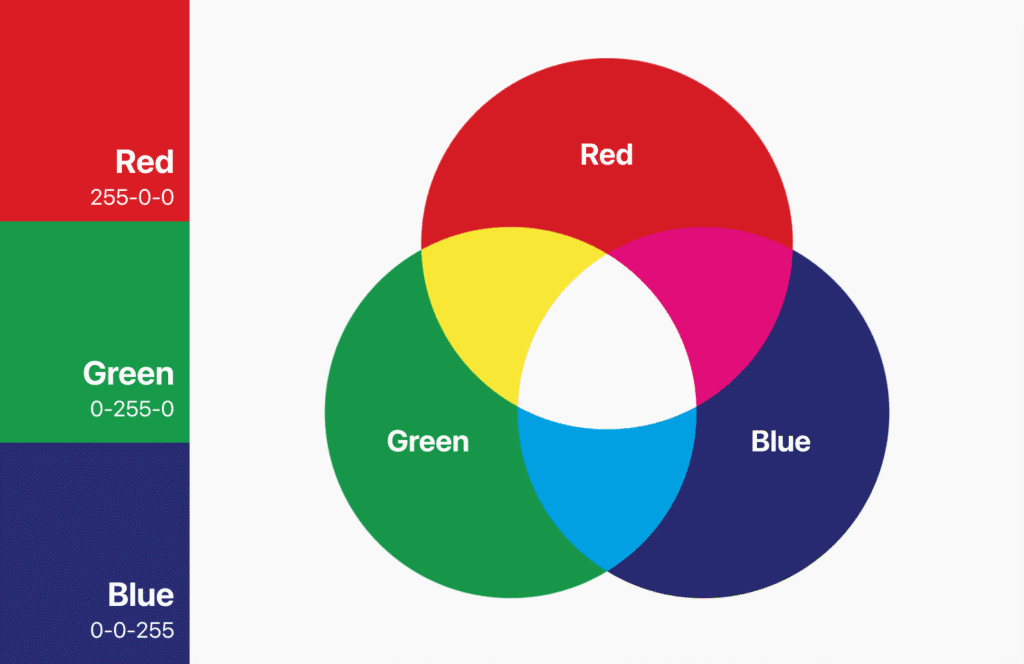
For web designers, RGB is your primary color model. RGB stands for Red, Green, and Blue—the three wavelengths of light that correspond to the three types of color-sensitive cone cells in human eyes. This isn’t arbitrary; it’s based on human biology and how we perceive color.
How RGB Works: RGB uses additive color mixing. Instead of subtracting light wavelengths like pigments do, RGB adds colored light together. Your computer monitor, smartphone, and television screen contain millions of tiny pixels, each composed of three sub-pixels that emit red, green, and blue light. By controlling the intensity of each sub-pixel, your screen can display millions of different colors.
When you combine all three RGB primaries at full intensity, you get white light—the presence of all visible wavelengths. Turn them all off, and you get black—the absence of light. This is the opposite of how pigments work, where mixing all colors creates darkness.
The RGB Color Specifications:
- Primary colors: Red (#FF0000 or rgb(255,0,0)), Green (#00FF00 or rgb(0,255,0)), Blue (#0000FF or rgb(0,255,0,0))
- Secondary colors: Cyan (green + blue), Magenta (red + blue), Yellow (red + green)
- Web color formats: Hexadecimal codes (#RRGGBB) or RGB values (rgb(r,g,b))
Why RGB Matters for Web Design: Every single color you specify in CSS, every image you optimize for web display, and every design element you create for digital screens operates in the RGB color space. When you write color: #FF5733; in your stylesheet, you’re specifying precisely how much red (FF=255), green (57=87), and blue (33=51) light each pixel should emit.
RGB produces a wider color gamut than CMYK or RYB, meaning it can display more vibrant, saturated colors. This is why images that look stunning on your screen sometimes appear duller when printed—the print medium simply can’t reproduce the full range of colors your screen displays.
Practical Web Design Tips:
- Always design in RGB color mode when creating digital assets
- Use hex codes or RGB values to specify colors in CSS for consistency
- Test designs on multiple screens, as different displays render colors slightly differently
- Consider how your RGB colors will convert if the design needs to be printed
- Remember that “web-safe colors” are largely obsolete with modern displays
When planning your UX design process, understanding RGB helps you make informed decisions about color contrast, accessibility, and cross-device consistency.
CMYK Model: The Print Professional’s Standard (Cyan, Magenta, Yellow, Key/Black)
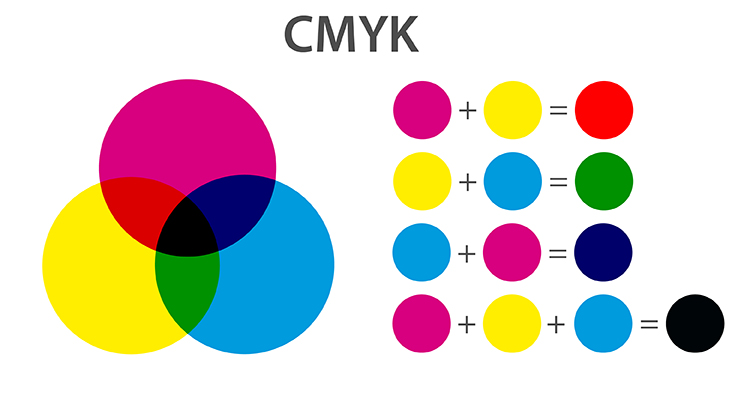
CMYK represents the industry standard for commercial printing. The model uses Cyan, Magenta, Yellow, and Key (black) as its primary colors. Here’s an interesting connection: CMYK’s primaries are actually RGB’s secondary colors. Cyan equals green plus blue light, magenta equals red plus blue light, and yellow equals red plus green light. This isn’t coincidence—it’s how subtractive color theory relates to additive color theory.
How CMYK Works: CMYK uses subtractive color mixing, similar to RYB but more scientifically accurate. When printing, you start with white paper that reflects all wavelengths of light. As you add ink, each color absorbs (subtracts) specific wavelengths:
- Cyan ink absorbs red light, reflecting blue and green
- Magenta ink absorbs green light, reflecting red and blue
- Yellow ink absorbs blue light, reflecting red and green
- Black ink (K) provides depth and true blacks
The “K” in CMYK stands for “Key,” referring to the key plate in printing that carries the black ink. Theoretically, mixing cyan, magenta, and yellow should produce black. In practice, this creates a muddy dark brown. Adding pure black ink allows printers to achieve true blacks, sharper text, and use less colored ink overall.
CMYK Color Values:
- Primary colors: Cyan (#00FFFF), Magenta (#FF00FF), Yellow (#FFFF00), Black (#000000)
- Color specification: CMYK percentages (e.g., C=50%, M=25%, Y=0%, K=10%)
The RGB-to-CMYK Challenge: This is crucial for web designers who also create print materials: not all RGB colors can be reproduced in CMYK. The CMYK color gamut is significantly smaller than RGB. That brilliant electric blue (#0000FF) on your screen might shift to a darker, less vibrant blue when printed. Neon greens, bright oranges, and vivid magentas often suffer the most in conversion.
When to Use CMYK:
- Commercial printing (brochures, business cards, posters)
- Packaging design
- Magazine and book publishing
- Any project that will be physically printed with ink
Best Practices for Web Designers:
- Design in RGB for screen, convert to CMYK only for print
- If creating dual-purpose designs, check CMYK conversion early in the process
- Use “soft proofing” in design software to preview how colors will shift
- Communicate with printers about color expectations and limitations
- Consider using Pantone spot colors for brand-critical colors that must match exactly
Color Model Comparison Table
| Feature | RYB | RGB | CMYK |
|---|---|---|---|
| Primary Colors | Red, Yellow, Blue | Red, Green, Blue | Cyan, Magenta, Yellow, Black |
| Mixing Type | Subtractive (pigment) | Additive (light) | Subtractive (ink) |
| Medium | Paint, traditional art | Digital screens, light | Printing, ink on paper |
| White | Paper/canvas | All colors at full intensity | Absence of ink (paper) |
| Black | Mixed from primaries | Absence of all light | Separate black ink (K) |
| Color Gamut | Limited, muddy secondaries | Wide, vibrant colors | Moderate, smaller than RGB |
| Best For | Art education, painting | Web design, apps, digital | Print materials, publishing |
| Technical Accuracy | Traditional, less precise | Based on human vision | Industry standard for print |
The Science Behind Primary Colors: How We Perceive Color
Understanding why RGB aligns with human vision requires a quick dive into color perception biology. Your eyes contain specialized photoreceptor cells called cones, concentrated in the central fovea of your retina. Three types of cone cells detect different wavelengths of light:
The Three Cone Types:
- S-cones (Short wavelength): Most sensitive to blue light, peak sensitivity around 420-440 nanometers
- M-cones (Medium wavelength): Most sensitive to green light, peak sensitivity around 530-540 nanometers
- L-cones (Long wavelength): Most sensitive to red light, peak sensitivity around 560-580 nanometers
This three-receptor system is called trichromatic vision, based on the Young-Helmholtz theory proposed in the 19th century. When light enters your eye, it stimulates these three cone types in varying degrees. Your brain interprets these signals as specific colors.
Here’s how it works in practice:
- Pure red light (700nm wavelength) strongly stimulates L-cones, minimally affects M-cones and S-cones → you perceive red
- Pure green light (530nm) strongly stimulates M-cones → you perceive green
- Pure blue light (450nm) strongly stimulates S-cones → you perceive blue
- Yellow light (580nm) stimulates both L-cones and M-cones equally → you perceive yellow
Why RGB Maps to Human Vision: RGB color displays work because they exploit your trichromatic vision. By precisely controlling red, green, and blue light intensities, screens can stimulate your cone cells in combinations that make you perceive millions of different colors—even colors that don’t exist as single wavelengths in nature.
For example, there’s no single “magenta” wavelength in the visible spectrum. Magenta is a perception created when your L-cones (red) and S-cones (blue) are stimulated simultaneously without M-cone (green) stimulation. Your brain fills in the gap and creates the sensation of magenta. This is why magenta is sometimes called a “non-spectral color.”
The Visible Light Spectrum: Human vision detects electromagnetic radiation with wavelengths between approximately 400 nanometers (violet) and 700 nanometers (red). This narrow band represents the visible light spectrum. Below 400nm, you have ultraviolet (UV) light that humans can’t see. Above 700nm lies infrared (IR) radiation, also invisible to human eyes.
Why This Matters for Designers: Understanding color perception helps explain why:
- Some color combinations create visual vibration or tension
- Color appearance changes based on surrounding colors (simultaneous contrast)
- Certain hues naturally draw more attention than others
- Individual color perception varies (including color blindness affecting about 8% of men and 0.5% of women)
- Lighting conditions dramatically affect how we perceive colors
This biological foundation is why RGB became the standard for digital displays—it’s literally built around how human eyes work.
How to Use Primary Colors in Web Design Effectively

Knowing color theory is valuable, but applying it strategically in web design separates amateur projects from professional work. Here’s how to leverage primary colors to create effective, conversion-focused websites.
Strategic Color Selection
Start with Your Primary Brand Color: Your primary color should represent your brand’s personality and values. This isn’t arbitrary—color psychology research shows that colors trigger specific emotional responses. Choose your dominant color based on:
- Red: Energy, passion, urgency, excitement (increases heart rate and can stimulate appetite)
- Blue: Trust, stability, professionalism, calmness (the most universally liked color)
- Green: Growth, health, nature, tranquility (associated with environmental consciousness)
- Yellow: Optimism, creativity, attention, warmth (increases mental activity)
- Purple: Luxury, creativity, wisdom, sophistication (historically associated with royalty)
Apply the 60-30-10 Rule: This interior design principle translates perfectly to web design:
- 60% = Dominant color (usually neutral or muted version of primary)
- 30% = Secondary color (complements the dominant)
- 10% = Accent color (bold primary for CTAs and important elements)
For example, a professional services website might use:
- 60%: Light gray backgrounds and white space
- 30%: Navy blue for headers and major sections
- 10%: Bright orange for buttons and calls-to-action
Consider Your Industry and Audience: Different sectors have color conventions:
- Finance/Banking: Blue (trust), green (money), gray (sophistication)
- Healthcare: Blue (trust), green (health), white (cleanliness)
- Food/Restaurant: Red (appetite), yellow (warmth), orange (comfort)
- Technology: Blue (innovation), black (sophistication), bright accent colors
- Eco/Sustainability: Green (nature), brown (earth), blue (water)
Breaking conventions can differentiate your brand, but understand what you’re working against.
Creating Visual Hierarchy
Use Primary Colors Strategically: Your brightest, most saturated primary colors should guide user attention to conversion points:
- Call-to-Action Buttons: Reserve your most vibrant color exclusively for primary CTAs
- Navigation Elements: Use consistent color coding to help users understand your site structure
- Error and Success States: Red for errors, green for success (universal conventions)
- Important Information: Highlight critical data with accent colors
The Contrast Principle: Primary colors stand out most against neutral backgrounds. A bright red button on a white background immediately draws the eye. That same red button on a purple background creates visual chaos and confusion.
Creating Depth and Balance: Don’t use primary colors at full saturation everywhere—you’ll overwhelm visitors:
- Use tints (primary + white) for backgrounds and large areas
- Use tones (primary + gray) for less important elements
- Use shades (primary + black) for footer and secondary sections
- Reserve pure, saturated primaries for small, important elements
When creating mobile app interface designs, this hierarchy becomes even more critical due to limited screen space.
Maintaining Consistency Across Devices
Color Management Challenges: RGB colors can appear different across devices due to:
- Screen technology (LCD, OLED, LED)
- Display calibration and settings
- Ambient lighting conditions
- Operating system color profiles
- Browser rendering engines
Best Practices for Consistency:
- Use Standardized Color Codes: Always specify colors using hex codes (#RRGGBB) or RGB values in your CSS. Never rely on color names like “red” or “blue”—they render inconsistently.
- Test on Multiple Devices: View your designs on various screens—desktop monitors, laptops, tablets, and smartphones—to identify significant color shifts.
- Consider sRGB Color Space: This is the standard RGB color space for web. Most browsers and devices default to sRGB, making it the safest choice for cross-platform consistency.
- Use Color Profiles: Modern browsers support ICC color profiles. For critical color accuracy (e-commerce, art portfolios), embed color profiles in your images.
- Account for Dark Mode: Many users enable dark mode on their devices. Test how your color scheme adapts and ensure sufficient contrast in both light and dark themes.
CSS Color Specification Example:
:root {
  --primary-color: #0066CC;
  --secondary-color: #33CC99;
  --accent-color: #FF6633;
  --neutral-dark: #333333;
  --neutral-light: #F5F5F5;
}

.cta-button {
  background-color: var(--accent-color);
  color: var(--neutral-light);
}
Using CSS variables ensures consistency throughout your project and makes global color updates simple.
Common Mistakes to Avoid
1. Using Too Many Primary Colors: Limit yourself to 2-3 primary colors maximum. More creates visual chaos and dilutes your brand identity. If you need variety, use different tints, tones, and shades of your core primaries.
2. Ignoring Color Context: Colors look different depending on what surrounds them. A medium gray appears lighter against black and darker against white. Always evaluate colors in context, not in isolation.
3. Neglecting Accessibility: We’ll cover this in detail below, but using color alone to convey information excludes color-blind users and fails WCAG compliance.
4. Assuming RGB Translates to Print: That vibrant website blue (#00CCFF) will shift to a duller tone in CMYK printing. If you’re creating branded materials for both web and print, start with CMYK-safe colors or expect to adjust.
5. Following Trends Blindly: Hot pink and neon green might be trendy, but they cause eye strain and accessibility issues. Choose colors that serve your users and brand, not just what’s fashionable.
6. Inconsistent Application: Using #0066CC in one place and #0065CB in another looks unprofessional. Maintain a documented color system and stick to it.
Primary Colors and Web Accessibility
Creating beautiful designs means nothing if significant portions of your audience can’t use them. Approximately 8% of men and 0.5% of women have some form of color vision deficiency, and many more users have low vision or work in challenging lighting conditions.
Understanding WCAG Color Contrast Requirements
The Web Content Accessibility Guidelines (WCAG) establish minimum contrast ratios between text and backgrounds:
WCAG 2.1 Level AA (Minimum):
- 4.5:1 contrast ratio for normal text (less than 24px or 18.5px bold)
- 3:1 contrast ratio for large text (24px+ or 18.5px+ bold)
- 3:1 contrast ratio for UI components and graphical elements
WCAG 2.1 Level AAA (Enhanced):
- 7:1 contrast ratio for normal text
- 4.5:1 contrast ratio for large text
Testing Your Colors: Use tools like WebAIM’s Contrast Checker to verify your color combinations meet standards. For example:
- White text (#FFFFFF) on red background (#FF0000) = 3.99:1 ratio (FAILS for normal text)
- White text (#FFFFFF) on dark blue (#000080) = 8.59:1 ratio (PASSES AAA)
- Black text (#000000) on yellow background (#FFFF00) = 19.56:1 ratio (PASSES AAA)
Designing for Color Blindness
The Three Main Types:
- Deuteranomaly/Deuteranopia (6% of men): Reduced sensitivity to green light—red and green appear similar
- Protanomaly/Protanopia (2% of men): Reduced sensitivity to red light—red appears darker and less bright
- Tritanomaly/Tritanopia (0.001%): Reduced sensitivity to blue light—blue and green, yellow and red appear similar
Problematic Color Combinations:
- Red and green (the most common issue)
- Blue and purple
- Light green and yellow
- Light blue and gray
Accessibility Best Practices:
1. Never Rely on Color Alone: Always pair color with other indicators:
- Use icons alongside colored buttons (✓ for success, ✗ for error)
- Add text labels to color-coded categories
- Use patterns or textures in addition to colors in charts and graphs
- Underline links, don’t just color them differently
2. Use High Contrast: Strong contrast helps everyone, including color-blind users. Dark text on light backgrounds or vice versa ensures readability regardless of color perception.
3. Test with Color Blindness Simulators: Tools like Coblis — Color Blindness Simulator or browser extensions show how your design appears to users with various forms of color vision deficiency.
4. Choose Accessible Primary Colors: Some color combinations work better for accessibility:
- Blue and orange (high contrast, distinguishable)
- Blue and yellow (high contrast, clear differentiation)
- Purple and yellow (strong distinction)
- Avoid red-green combinations for critical information
5. Provide Alternative Viewing Modes: Consider offering high-contrast modes or allowing users to customize color schemes for their needs.
Form Design Accessibility
Forms present particular challenges with primary colors:
DON’T:
- Use only red borders to indicate errors
- Show success with green coloring alone
- Create required fields indicated only by red asterisks
DO:
- Combine red borders with error icons and descriptive text
- Add success messages with text and check marks, not just green
- Mark required fields with labels (“Required”) plus visual indicators
Primary Colors in Brand Identity: Real-World Examples
Let’s examine how successful brands leverage primary colors to create memorable, effective identities. These examples show strategic color use that goes far beyond aesthetics.
Coca-Cola: The Power of Red

Primary Color: Red (#F40009)
Coca-Cola’s signature red is arguably the world’s most recognized brand color. The company has used this vibrant red since the 1890s, creating over a century of color consistency.
Strategic Choices:
- Appetite Stimulation: Red psychologically increases appetite and heart rate, perfect for a beverage brand
- Energy and Excitement: The bold red communicates vitality and passion
- Attention-Grabbing: Red naturally draws the eye, making Coca-Cola products stand out on shelves
- Cultural Adaptability: Red holds positive associations across most cultures (though meanings vary)
Web Design Application: Coca-Cola’s website uses red strategically—not everywhere. They balance the bold primary with white space and imagery, reserving pure red for the logo, CTAs, and key brand moments. This prevents overwhelm while maintaining brand recognition.
Facebook: Building Trust with Blue

Primary Color: Facebook Blue (#1877F2)
Facebook’s choice of blue wasn’t accidental. Mark Zuckerberg is red-green colorblind, making blue the richest color for him to see. But the color also serves strategic purposes.
Strategic Choices:
- Trust and Reliability: Blue is consistently rated as the most trustworthy color, crucial for a platform handling personal data
- Professionalism: Blue communicates stability and competence
- Calmness: The color reduces stress, encouraging longer platform engagement
- Universal Appeal: Blue is the most universally liked color across cultures and genders
Web Design Application: Facebook demonstrates the 60-30-10 rule perfectly—white/light gray (60%), Facebook blue (30%), and various accent colors (10%) for notifications and interactions. The blue creates instant brand recognition while maintaining a clean, usable interface.
McDonald’s: Red and Yellow Energy

Primary Colors: Red (#DA291C) and Yellow (#FFC72C)
McDonald’s iconic golden arches paired with red create one of the most effective color combinations in branding history.
Strategic Choices:
- Appetite Stimulation: Both red and yellow increase hunger and energy levels
- Attention-Grabbing: This combination is visible from great distances (important for roadside locations)
- Happiness and Optimism: Yellow evokes joy and positivity
- Quick Service Association: Red and yellow together communicate speed and convenience
- Child Appeal: Bright, bold primary colors attract children and families
Web Design Application: McDonald’s website balances these strong primaries with white space and appetizing food photography. The colors guide users to promotions and ordering options without overwhelming the content.
Spotify: Green Innovation

Primary Color: Spotify Green (#1DB954)
Spotify chose green to differentiate itself in a tech market dominated by blues and blacks.
Strategic Choices:
- Differentiation: Green stands out among streaming competitors
- Growth and Vitality: Communicates a growing, evolving platform
- Creativity: Green suggests artistic expression and freshness
- Energy: The vibrant shade conveys enthusiasm for music
Web Design Application: Spotify uses its signature green sparingly against dark backgrounds, creating high contrast and visual impact. The dark theme reduces eye strain during extended listening sessions, while green highlights important actions and premium features.
Key Takeaways from Brand Examples
What makes these primary color strategies successful:
- Consistency Over Time: These brands maintain their core colors across decades, building powerful associations
- Strategic Psychology: Each color choice aligns with brand values and desired customer emotions
- Balanced Application: None overwhelm users with primary colors—they use white space and neutrals
- Cross-Platform Recognition: The colors work identically across web, mobile, packaging, and physical locations
- Cultural Consideration: While maintaining core identity, these brands adjust color usage for different markets when necessary
When you’re seeking inspiration for your own designs, exploring best websites for web design inspiration can reveal how different industries apply primary color strategies effectively.
Mixing Primary Colors: Creating Secondary and Tertiary Colors
Understanding how primary colors combine expands your design palette dramatically. Each color model produces different results when mixing primaries.
RGB Color Mixing (Additive)
In the RGB additive system, combining colored lights creates brighter colors:
Secondary Colors from RGB Primaries:
- Red + Green = Yellow (#FFFF00)
- Red + Blue = Magenta (#FF00FF)
- Green + Blue = Cyan (#00FFFF)
Notice something interesting? RGB’s secondary colors become CMYK’s primaries. This relationship between additive and subtractive color systems forms the foundation of modern color science.
Creating Tints in RGB: Add white (increase all RGB values equally) to create lighter versions:
- Pure Red (255, 0, 0) → Light Pink (255, 182, 193)
- Pure Blue (0, 0, 255) → Light Blue (173, 216, 230)
Creating Shades in RGB: Add black (decrease all RGB values equally) to create darker versions:
- Pure Green (0, 255, 0) → Dark Green (0, 100, 0)
- Pure Red (255, 0, 0) → Dark Red (139, 0, 0)
Web Design Application: Modern CSS makes color mixing easy:
.light-primary {
  background-color: rgba(255, 0, 0, 0.3); /* 30% opacity red = light pink tint */
}

.dark-primary {
  filter: brightness(0.5); /* 50% brightness = darker shade */
}
CMYK Color Mixing (Subtractive)
In CMYK subtractive mixing, combining inks absorbs more light, creating darker colors:
Secondary Colors from CMYK Primaries:
- Cyan + Magenta = Blue
- Cyan + Yellow = Green
- Magenta + Yellow = Red
This is why CMYK can theoretically reproduce most colors—its primaries are already the secondary colors of light.
Creating Tints in CMYK: Reduce ink percentages to allow more white paper to show through:
- Pure Cyan (100%, 0%, 0%, 0%) → Light Cyan (30%, 0%, 0%, 0%)
Creating Shades in CMYK: Add black (K) percentage:
- Pure Magenta (0%, 100%, 0%, 0%) → Dark Magenta (0%, 100%, 0%, 40%)
RYB Color Mixing (Traditional)
The traditional art school model:
Secondary Colors from RYB Primaries:
- Red + Yellow = Orange
- Yellow + Blue = Green
- Red + Blue = Purple
Tertiary Colors (Primary + Secondary):
- Red + Orange = Red-Orange
- Yellow + Orange = Yellow-Orange
- Yellow + Green = Yellow-Green
- Blue + Green = Blue-Green
- Blue + Purple = Blue-Purple
- Red + Purple = Red-Purple
These twelve colors (3 primaries, 3 secondaries, 6 tertiaries) form the traditional color wheel taught in art classes.
The Color Wheel and Harmonious Palettes
Understanding color relationships helps create visually pleasing combinations:
Complementary Colors: Opposite on the color wheel (high contrast, vibrant)
- Red and Green
- Blue and Orange
- Yellow and Purple
Analogous Colors: Adjacent on the color wheel (harmonious, low contrast)
- Blue, Blue-Green, Green
- Red, Red-Orange, Orange
Triadic Colors: Three colors equally spaced on the wheel (balanced, vibrant)
- Red, Yellow, Blue (primary triad)
- Orange, Green, Purple (secondary triad)
Split-Complementary: One color plus the two colors adjacent to its complement
- Blue with Red-Orange and Yellow-Orange
For comprehensive palette ideas, explore our guide to 50 color combinations that work across different design contexts.
Mastering Primary Colors for Better Web Design
Understanding primary colors transforms from abstract color theory into practical web design advantage when you recognize which system applies to your work. For digital designers, RGB forms your foundation—every hex code, every CSS color value, every pixel on screen operates through red, green, and blue light combining in precise proportions.
The confusion around “which primary colors are correct” dissolves when you understand the context. Painters working with physical pigments rely on RYB (or more accurately, CMY). Printers use CMYK with its four-ink system. Web designers and digital creators work in RGB because screens emit light that stimulates our three types of cone cells.
Key Principles to Remember:
- Medium Determines Model: Choose your primary color system based on your output—RGB for screens, CMYK for print, RYB for traditional art
- Color Psychology Drives Decisions: Beyond technical specifications, colors trigger emotional responses that affect user behavior and brand perception
- Accessibility Is Non-Negotiable: Beautiful colors mean nothing if users can’t see or distinguish them—always test contrast ratios and color-blind scenarios
- Consistency Builds Brands: Document your color system and apply it consistently across all touchpoints
- Context Changes Perception: Colors look different depending on surroundings, lighting, and adjacent hues
Implementing Your Color Strategy:
Start your next web design project by:
- Selecting your primary color based on brand psychology and industry conventions
- Defining RGB values and hex codes for consistency
- Creating tints, tones, and shades for variation
- Testing all combinations for WCAG compliance
- Documenting your system in a style guide
The most effective web designs don’t just use primary colors—they leverage them strategically to guide attention, build trust, and drive conversions. Whether you’re designing a corporate website that needs to project professionalism through strategic blue usage, or an e-commerce site that uses red to create urgency around limited-time offers, understanding primary colors gives you the tools to make informed, effective design decisions.
Ready to create a website with a strategically designed color palette?
Web Guider Agency specializes in creating visually stunning, conversion-optimized websites built on solid color theory principles. Our team understands how to leverage primary colors to strengthen your brand identity, improve user experience, and drive measurable results. Contact us today to discuss your web design project.
Frequently Asked Questions About Primary Colors
1. Are red, yellow, and blue really the primary colors?
Red, yellow, and blue are primary colors in the RYB model used in traditional art and painting, but modern color science recognizes different primaries for different applications. For digital screens and web design, the primary colors are RGB (red, green, blue), which work through additive light mixing.
For printing, the industry uses CMYK (cyan, magenta, yellow, plus black), which operates through subtractive ink mixing. Each system is correct within its specific context. If you’re designing websites or digital content, RGB is your primary color model. The RYB model remains useful for traditional painting and art education, but lacks the scientific precision of RGB and CMYK systems.
2. Why are there different sets of primary colors?
Different primary color sets exist because color behaves fundamentally differently depending on whether you’re working with light, pigment, or ink. RGB uses additive color mixing where colored lights combine to create brighter colors—add all three primaries together and you get white light. CMYK uses subtractive color mixing where inks absorb wavelengths of light—combine all inks and you approach black.
RYB is a traditional model for mixing paint pigments. Each system is optimized for its specific medium: screens emit light (RGB), printers use ink on paper (CMYK), and painters mix physical pigments (RYB). The human eye perceives color through three types of cone cells sensitive to red, green, and blue wavelengths, which is why RGB aligns with human vision and became the standard for digital displays.
3. Can you really make all colors from primary colors?
No—this is a common misconception taught in elementary schools. While primary colors can create a wide range of colors (called a color gamut), no three primaries can produce every possible color that humans can perceive. RGB and CMYK have different gamuts, meaning some colors visible on your screen (RGB) cannot be accurately reproduced when printed (CMYK), and vice versa.
For example, vibrant oranges and electric blues often lose saturation when converting from RGB to CMYK for printing. This is why professional designers must consider color gamut limitations when creating designs that need to work across both digital and print mediums. Even within a single system, certain highly saturated or neon colors fall outside what three primaries can produce.
4. What’s the difference between RGB and CMYK primary colors?
RGB (Red, Green, Blue) is an additive color model used for screens and digital displays, where colored light combines to create white. When you view a website, your screen emits precise combinations of red, green, and blue light to produce millions of colors. CMYK (Cyan, Magenta, Yellow, Black) is a subtractive color model used in printing, where ink absorbs light wavelengths.
When printing, you start with white paper and add inks that absorb specific colors while reflecting others. RGB produces more vibrant colors and a larger gamut because it’s adding light, while CMYK is limited to what can be reproduced with ink on paper. Interestingly, RGB’s secondary colors (cyan, magenta, yellow) become CMYK’s primaries, showing how additive and subtractive color systems relate to each other. For web designers, this means always designing in RGB for screen display, and only converting to CMYK when preparing files for commercial printing.
5. Which primary colors should I use for web design?
Always use RGB (Red, Green, Blue) as your primary color model for web design and digital projects. Screens display color by emitting light in combinations of red, green, and blue, so RGB is the only color model that accurately represents how your designs will appear on monitors, smartphones, tablets, and televisions.
You’ll specify colors using hexadecimal codes (like #FF0000 for pure red) or RGB values (like rgb(255,0,0)) in your CSS. These formats allow precise control over the exact color your users will see. CMYK is only necessary if you’re also creating printed materials like brochures or business cards. RYB is primarily for traditional painting and art education, not digital design. Most design software defaults to RGB mode for web projects, but always verify your color mode before starting. For maintaining consistency across digital platforms, document your RGB color values in a brand style guide and use CSS variables to implement them consistently throughout your website.