When you think of Nike, you see black. Coca-Cola brings red to mind. Spotify? That’s green. These brands prove that using one color can be more powerful than using many. Many people think monochromatic means boring, but the truth is different. Monochromatic color schemes are perceived as more harmonious and elegant, often used in luxury branding. We’ll show you what monochromatic colors really are, how to create them, and why they work so well in design.
Understanding The Basics Of Monochromatic Design
The word monochromatic comes from two Greek words. Mono means one, and chroma means color. A monochromatic color scheme involves variations of a single color, or hue. But this does not mean you just use the same color over and over.
Think of it this way. You pick one base color from the color wheel. Then you create different versions of that color. You make some lighter, some darker, and some less bright. All these versions come from the same color family.
Creating Tints For Lighter Variations
Tints happen when you add white to your base color. When white is added to a base hue to lighten it, it’s called a tint. This makes the color softer and lighter. For example, add white to red and you get pink. Add white to blue and you get light blue. These lighter versions work great for backgrounds and areas where you want a gentle touch.
Creating Shades For Darker Versions
Shades are different. You make shades by adding black to your base color. Shades are the base color darkened with black. This makes the color darker and stronger. Blue plus black becomes navy. Red plus black turns into a deep maroon. Use shades when you need depth, like for text or headers.
Creating Tones For Balanced Colors
Tones sit between tints and shades. When gray is added to a base hue, it creates a tone. Gray makes the color less bright but not lighter or darker. Tones feel more natural and sophisticated. They work well when you want a professional look without too much brightness.
Understanding these three variations gives you endless options. You start with one color but end up with a whole palette. This is why monochromatic does not mean limited.
Tints, Shades & Tones Explained
See how one color creates endless variations
Tints
Base Color + White
Shades
Base Color + Black
Tones
Base Color + Gray
Building Your Own Single Color Palette
Creating your own monochromatic palette is easier than you think. Follow these steps to build a color scheme that works.
Choose Your Base Color Carefully
Your base color sets the mood for everything else. The base color is the starting point of your design. Pick a color that fits your brand and message. Blue feels calm and trustworthy. Red brings energy and excitement. Green suggests growth and nature. Look at the 12 primary and secondary colors on the color wheel as your starting point.
Think about what you want people to feel. A spa might choose soft blue or green. A sports brand might pick bold red or orange. Your base color will shape every other choice you make.
Add White For Soft Backgrounds
Once you have your base color, start making tints. Add white bit by bit. Create three or four lighter versions. These work perfectly for backgrounds. They give your design breathing room without adding new colors. Light tints also make text easier to read.
Add Black For Strong Elements
Next, create shades by adding black. Make a few darker versions of your base color. These darker shades work great for important elements. Use them for headings, buttons, or areas you want to emphasize. Dark shades add weight and importance to your design.
Add Gray For Middle Ground
Finally, mix in some gray to create tones. These muted versions add sophistication. Tones bridge the gap between your lightest tints and darkest shades. They keep your design from feeling too extreme.
Now you have a complete palette. One base color has given you eight or nine usable colors. All of them work together perfectly because they come from the same family.
Monochromatic Palette Builder
Generate a complete color system from one base color
The Benefits Of Using One Color In Design
Designers choose monochromatic colors for good reasons. These palettes offer advantages you won’t get from multi-color schemes.
A monochromatic color palette creates a harmonious, visually cohesive look. When all your colors come from one family, nothing clashes. Your design feels unified and professional. This harmony helps viewers focus on your content instead of being distracted by competing colors.
The approach makes design work faster too. Using a monochromatic palette makes your job as a designer easier and faster because you don’t have to stress over picking colors or wondering if they go together. You spend less time testing color combinations. Every color you create will naturally work with the others.
Monochromatic palettes help content stand out. A one-color palette doesn’t draw attention to itself, but lets your content shine. Your message takes center stage. The colors support your content without fighting for attention. This works especially well for text-heavy designs or when you want readers to focus on information.
These color schemes strengthen brand memory too. Using monochromatic colors can help associate brands with a specific, memorable color. Think about how quickly you recognize brand colors. Nike owns black. Coca-Cola owns red. When you stick to one color family, people remember your brand faster.
Single-color palettes also simplify accessibility. Maintaining good contrast becomes easier when you work with different values of one color. You can test your lightest tints against your darkest shades to ensure readability. This matters for users with vision challenges.
Monochromatic Example : How Famous Brands Use Single Color Schemes
Real brands prove that monochromatic design works. Let’s look at companies that built empires on single colors.
Nike’s Black Power
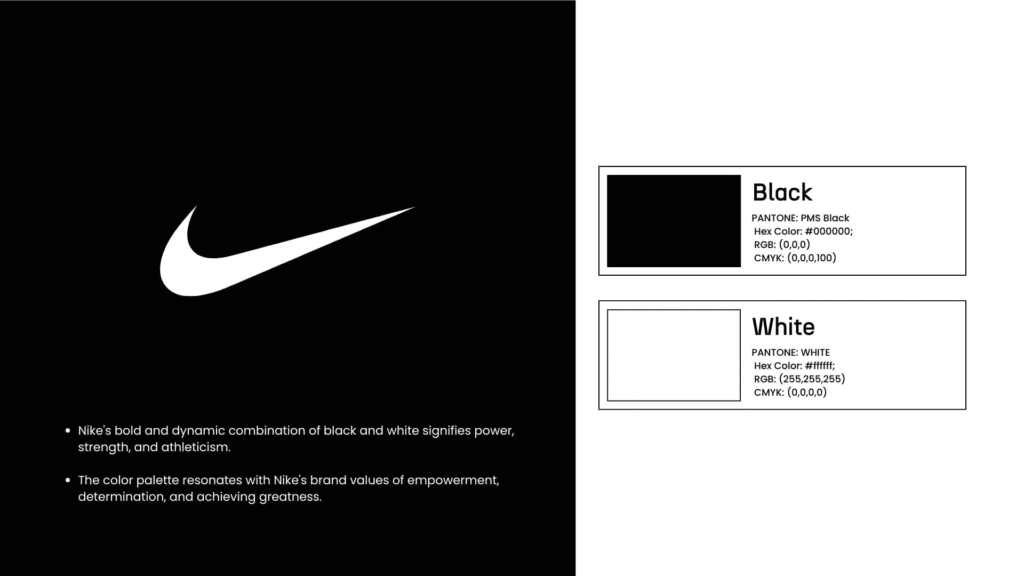
Nike is a perfect example of a brand that uses monochrome colors, with people familiar with the black Nike logo with the Swoosh being one of the most recognized logos in the world. The black swoosh appears everywhere. On shoes, clothing, websites, and ads. This simple black symbol works because it feels strong and modern.
Black conveys power and athleticism. The blackness of the logo gives a fierce and bold impression, symbolizing a modern professional athletic individual. Nike could use many colors, but black creates instant recognition. When you see that black swoosh, you know the brand immediately.
Coca-Cola’s Red Strategy

The color red is the first thing that comes to mind regarding Coca-Cola, and its bold red color is incorporated into all the advertising. For over a century, Coca-Cola has owned red. The bright red can, the red logo, the red trucks. Everything uses variations of the same red family.
Red makes sense for a beverage company. It increases appetite and creates excitement. It also stands out on store shelves. Coca-Cola proves that sticking to one color for decades builds unshakeable brand recognition.
Apple’s Silver And Gray Minimalism
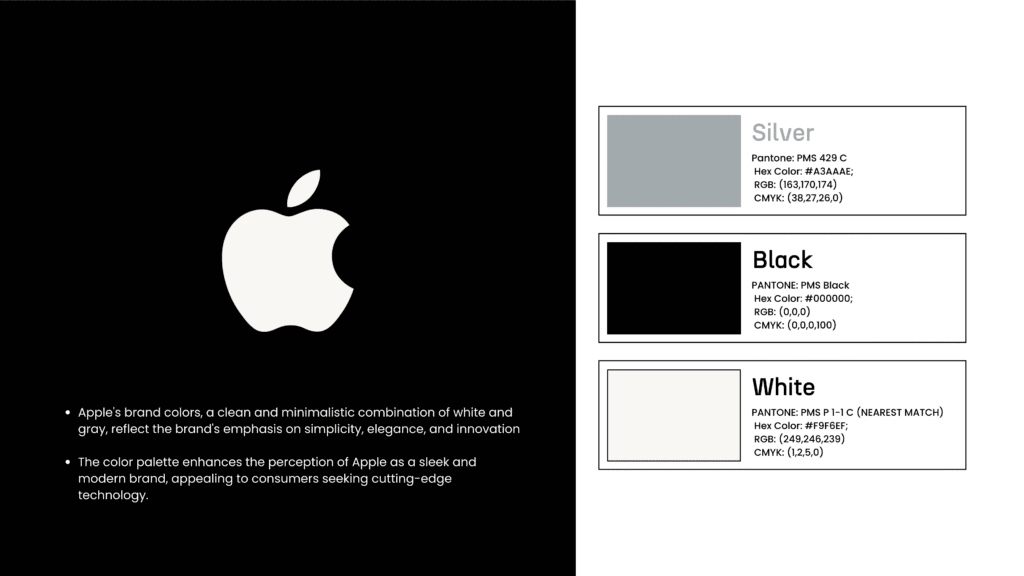
Apple uses silver and gray as part of its brand identity, and applies these colors correctly in its logos and product design, conveying sophistication, innovation, and a high-tech quality. From MacBooks to iPhones, Apple products share the same sleek silver and gray tones. This creates a family feeling across all devices.
The neutral grays signal innovation and quality. Apple’s website shows masterful play of whites, grays, and blacks as perfect examples of monochromatic color schemes at work. These colors let the products themselves shine. The simple palette also makes Apple stores feel clean and modern.
Spotify’s Green Identity

Spotify’s artist pages are bathed in various shades of green, showing monochromatic color schemes at work. The bright green appears in the app, on playlists, and in marketing. Spotify uses different shades of green to create depth without adding new colors.
Green sets Spotify apart in the tech world. While most tech companies use blue, Spotify chose green. This makes them stand out. The color also feels fresh and creative, perfect for a music platform.
McDonald’s Yellow Energy

McDonald’s bold use of yellow is a monochromatic success story, with golden arches being easily some of the most recognizable symbols globally. Those golden arches shine from highways everywhere. The bright yellow paired with red creates energy and hunger.
The yellow color appeals to consumers of all ages because it represents happiness and warmth. Yellow also catches your eye from far away. This matters when drivers need to spot restaurants quickly. McDonald’s proves that bold primary colors work for global brands.
Monochromatic Brands in Action
How industry giants use single-color strategies
Practical Applications For Every Design Project
Monochromatic colors work across different mediums. Here’s how to use them in various projects.
Web Design Applications
A monochromatic color scheme can help designers use color in a visually engaging fashion. Websites using one-color palettes feel clean and modern. The simplicity helps users navigate without confusion. You can use your lightest tints for backgrounds, medium tones for sections, and darkest shades for text and buttons.
Many designers worry that monochromatic sites look boring. But texture, images, and white space add interest. Look at website design inspiration to see how professionals use single colors effectively. When combined with good layout and strong content, monochromatic sites perform beautifully.
Graphic Design Work
Monochromatic colors mean we use only one color, and this could be a challenge in design, but can be used in an effective, visually engaging way. Logos, posters, and marketing materials benefit from single-color approaches. The unified look makes designs feel more professional and memorable.
For logos especially, monochromatic works well. Simple color schemes reproduce better across different materials. They work in print, on screens, and even when embroidered. This flexibility saves money and maintains consistency.
Interior Design Spaces
Using multiple shades of one color softens the look of a monochromatic palette, imbuing relaxing energy into any space. Rooms decorated in one color family feel calm and cohesive. Light blues create peaceful bedrooms. Warm browns make cozy living rooms. The approach also makes small spaces look bigger.
Interior designers often combine different textures within the same color family. A blue room might have a navy sofa, light blue walls, and teal pillows. Different materials like velvet, linen, and wood add variety while staying within one color story.
Photography Enhancements
Designs that feature photography can use a monochromatic color scheme by applying a transparent color overlay or screen over the top. This technique transforms regular photos into artistic pieces. Black and white photos with a blue overlay create cool tones. Red overlays add warmth.
The monochromatic approach helps photo collections look unified. When you shoot many different scenes, color overlays tie them together. Instagram filters work this way. They apply monochromatic tones to create a consistent feed aesthetic.
What Not To Do With Monochromatic Palettes
Even good color schemes can fail with poor execution. Avoid these common mistakes.
Using too little contrast creates readability problems. Low-contrast monochrome designs can reduce readability, making text hard to read, especially for visually impaired users. If your lightest and darkest colors sit too close together, text disappears into backgrounds. Always test your color combinations for sufficient contrast. Use tools to check that your text meets accessibility standards.
Creating flat, boring designs without variation happens when you forget texture and pattern. Monochromatic does not mean monotonous. Texture and pattern benefit monochromatic designs and can break up the color field and add visual interest. Add different materials, patterns, or graphic elements. These additions create depth without adding new colors.
Choosing the wrong base color for your message confuses viewers. If you pick blue for a food brand, people might feel less hungry. Red for a meditation app creates unwanted energy. Think carefully about color psychology before committing to your base color.
Overusing the pure base color at full saturation overwhelms people. A single-color scheme may not fully convey complex emotions or diverse brand messaging. Use your brightest, most saturated version sparingly. Save it for small accent areas like buttons or icons. Fill most of your design with softer tints and tones.
Forgetting about accessibility hurts your audience. Monochromatic schemes may fail color contrast ratio guidelines, making them problematic for websites and branding. Always test contrast ratios between text and backgrounds. Aim for at least 4.5:1 for normal text and 3:1 for large text. These standards ensure everyone can read your content.
Best Resources To Generate Your Color Scheme
The right tools make creating monochromatic palettes simple. Here are the best options.
Adobe Color offers a free online tool with a monochromatic option. You pick your base color and the tool generates tints, shades, and tones automatically. The interface shows how colors work together. You can also extract colors from photos to match existing designs.
Coolors provides a palette generator with monochromatic presets. Press the spacebar to generate random palettes or lock colors you like. The tool lets you adjust hue, saturation, and brightness individually. Export options work for most design software.
Figma includes built-in color tools for designers. Figma’s professional design resources can help kickstart your color palette by browsing design basics library to read up on color theory. You can create color styles and share them across your team. The platform also has community templates showing monochromatic designs in action.
Canva offers templates with monochromatic schemes already built in. If you’re not a professional designer, these templates give you a head start. Pick a template in your chosen color and customize from there. The drag-and-drop interface makes design accessible.
Benjamin Moore Color Preview helps with interior design. Benjamin Moore created Color Preview, a color collection that ranges from bright and vibrant, to more subtle versions of the same hues. This tool shows how paint colors look in actual rooms. You can visualize monochromatic schemes before buying paint.
The color wheel remains your most basic tool. Understanding how tints, shades, and tones work helps you create palettes manually. Most design software includes color pickers that let you adjust lightness and saturation. Learning to use these controls gives you complete flexibility.
Making Your Single Color Palette Work
Advanced techniques take monochromatic designs from good to great. These tips elevate your work.
Use contrast strategically to create visual hierarchy. Contrast is important within a monochromatic scheme, using contrasting shades to emphasize elements and create focal points. Place your lightest tints next to your darkest shades for maximum impact. This directs attention to important elements like call-to-action buttons or headlines.
Add texture and patterns for visual interest. Monochromatic designs benefit from the use of textures and patterns that can break up the color field and add visual interest. Use different materials in physical designs. In digital work, add subtle patterns, gradients, or shadows. These elements create depth without introducing new colors.
Apply the 60-30-10 rule for balanced distribution. Use your dominant color for 60% of the design, typically in lighter tints for backgrounds. Your secondary variation covers 30%, often medium tones for main content areas. The remaining 10% uses your boldest version for accents and important actions.
60-30-10 Rule: Monochromatic Edition
Perfect distribution for single-color schemes
Monochromatic Design
One color, infinite possibilities
Test accessibility with contrast checkers before launching. WebAIM and similar tools measure whether your text meets readability standards. The Web Content Accessibility Guidelines has rules on color contrast between text and its background, and monochromatic color schemes such as black and white can be used to create greater contrast. Fix any combinations that fall below the 4.5:1 minimum ratio.
Consider color psychology for your specific audience. Monitor color trends and consider their meanings, for instance, using green conveys the message of health, sustainability, and caring for the environment. Different colors trigger different emotions. Blue calms people. Red energizes them. Green connects to nature. Match your color choice to the feeling you want to create. Check out our guide to color combinations to understand color psychology better.
Experiment with saturation levels to add variety. Not every element needs the same saturation. High saturation draws attention. Low saturation fades into the background. Play with saturation to guide the viewer’s eye through your design in the order you choose.
Use white space effectively to let your design breathe. Monochromatic does not mean filling every inch with color. Skillfully incorporating white and black into your designs can help create sharp contrasts, add clarity, and make your monochromatic designs pop. Strategic empty space makes your colored elements stand out more.
Creating Harmony Through Simplicity
Monochromatic color schemes are set to be a major design trend in 2025. We’ve seen how one color creates endless possibilities. Tints, shades, and tones give you variety while maintaining unity. Major brands trust this approach because it works.
The power of monochromatic design lies in its simplicity. Instead of juggling multiple colors, you master one. This creates harmony that viewers feel instantly. Your designs look more professional and cohesive without extra effort.
In 2025 logo data, the colors with the most monochromatic pairings were brown, blue, and yellow, with folks toggling between dark tones and light ones to create that unified monochromatic look. These trends show that designers across industries rely on single-color palettes for good reason.
Remember that less can truly be more in design. When you’re planning your UX design process or building your next website, consider the monochromatic approach. One well-chosen color with thoughtful variations often beats a rainbow of competing hues.
Start with one color. Create your tints, shades, and tones. Test your contrasts. Add texture for interest. Then watch as your simple palette creates something beautiful.